
IGET Bar Plus
IGET Bar Plus Not Working? Troubleshooting, Usage & Safety Guide
Sep
IGET Bar Plus Not Working? Troubleshooting, Usage & Safety Guide
If your IGET Bar Plus is not working, flashing unexpectedly, making a hissing sound, or the indicator light stays on, there are several possible explanations. Some problems are simple to resolve, while others indicate that the device or pod should no longer be used.
This guide explains the most common IGET Bar Plus questions, including how to tell when an IGET Bar Plus has run out, why an IGET Bar Plus may not work, what flashing lights can mean, and what to do when a device produces little or no vapour.
For information about the IGET Bar Plus range, you can also visit the IGET Bar Plus category to see the products and specifications currently listed on IGET Vapes Canberra.
How Does the IGET Bar Plus Work?
The IGET Bar Plus is designed as a relatively straightforward vape device. Depending on the specific model, activation occurs when the device detects an inhale, while an indicator light can provide information about the device’s operating status.
Because IGET Bar Plus models can differ, it is important to check the instructions supplied with the particular version you have rather than assuming that every model operates identically.
If you’re comparing different versions, the IGET Bar Plus range provides a convenient place to review the available products.
How to Use an IGET Bar Plus
For a model that is ready to use:
- Check the device and packaging for any visible damage.
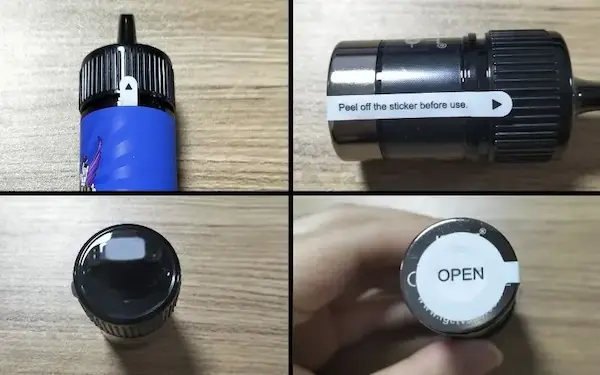
- Remove any protective packaging or seals specified by the manufacturer.
- Follow the instructions supplied with your particular model.
- Take a normal, gentle draw rather than an excessively forceful inhale.
- Stop using the device if it becomes unusually hot, damaged, leaks, or behaves unexpectedly.
Do not attempt to modify the device or remove internal components.
How Do You Know When an IGET Bar Plus Has Run Out?
One of the most common questions is how to tell when an IGET Bar Plus has run out.
Possible signs include:
- Little or no vapour is produced.
- The flavour becomes noticeably weaker.
- The device’s indicator behaves differently from normal.
- The device no longer activates when inhaled.
- The liquid or pod appears depleted where the model allows it to be visually checked.
- The device reaches the end of its intended service life.
A lack of vapour does not necessarily mean that the device has simply “run out.” A blocked airflow path, depleted battery, pod issue, or device fault can produce similar symptoms.
If troubleshooting does not resolve the problem, discontinue use rather than repeatedly attempting to activate the device.
Why Is My IGET Bar Plus Not Working?
If your IGET Bar Plus is not working, first consider the simplest possibilities.
1. Check the airflow
If the airflow is obstructed, the device may not detect an inhale correctly. Check for obvious external obstruction around the airflow openings.
Do not insert sharp objects into the device.
2. Check for visible damage
Inspect the device for:
- Cracks
- Leaking liquid
- Significant dents
- Loose components
- Unusual swelling
- Heat damage
A damaged vape should not be used.
3. Consider battery depletion
If the battery is depleted, the device may stop producing vapour. Whether a particular IGET Bar Plus model is rechargeable depends on the model, so follow the manufacturer’s instructions rather than assuming that it can be charged.
4. Check the pod or device connection
For models using a removable pod, make sure the pod is positioned correctly according to the manufacturer’s instructions.
Do not force a pod into place.
5. Consider whether the device has reached the end of its usable life
If the device has been used extensively and flavour and vapour production have progressively declined, it may simply have reached the end of its intended use.
Why Is My IGET Bar Plus Flashing?
A flashing indicator can have different meanings depending on the model.
It may indicate a condition involving:
- Battery status
- Inhalation or activation
- Airflow
- Pod detection
- A protection feature
- A device fault
There is no single flashing-light meaning that applies safely to every IGET Bar Plus version.
If your device is flashing and will not operate normally, consult the instructions for that specific model. If the device becomes hot, leaks, smells unusual, or appears damaged, stop using it.
Why Is My IGET Bar Plus Light Staying On?
If the indicator remains illuminated after you stop inhaling, the device may not be returning to its normal inactive state.
Possible causes include an activation or sensor issue, airflow-related activation, or a fault.
Do not repeatedly activate the device to test it. If the light remains on unexpectedly, particularly if the device is heating without being used, stop using it and place it somewhere safe away from flammable materials.
Why Does My IGET Bar Hiss?
A faint sound during normal operation can occur when the heating element is producing vapour. However, persistent, unusually loud, or unexpected hissing deserves attention.
If your IGET Bar is hissing when you are not inhaling, becomes unusually hot, leaks, or continues activating by itself, stop using it.
Do not attempt to repair the internal electronics yourself.
Why Is My IGET Bar Hissing After a Puff?
A brief sound immediately during or shortly after inhalation can occur as the heating element operates. However, continued hissing after use can indicate that the device is still activating.
If the sound continues unexpectedly, stop using the device rather than trying to force it to operate normally.
How to Fix an IGET Bar That Is Not Working
There is an important difference between troubleshooting a device and attempting to repair its internal electronics.
Safe external checks include:
- Inspecting the device for visible damage.
- Checking that airflow openings are not externally blocked.
- Checking whether the device has reached the end of its usable life.
- Checking the manufacturer’s instructions for the exact model.
- Confirming that a removable pod is correctly positioned where applicable.
If those checks do not resolve the problem, replacing or returning a faulty product through the appropriate seller or manufacturer process is safer than opening the device.
Can You Reset an IGET Bar Plus?
Searches for “how to reset IGET Bar Plus” are common, but users should not assume that every IGET Bar Plus model has a user-accessible reset procedure.
If the device is malfunctioning, follow the instructions supplied for that exact model. Avoid attempting electrical resets, internal modifications, or unofficial repair procedures.
Can You Unlock an IGET Bar Plus?
Some searches refer to “how to unlock IGET Bar Plus,” “how to unlock IGET Bar Plus V3,” or similar phrases.
The meaning of “unlock” can vary. It may refer to a device control, an activation issue, or a model-specific feature.
Rather than trying to bypass a safety mechanism or child-safety feature, check the documentation for the exact model. Do not attempt to defeat or modify a safety lock.
What About the IGET Bar Plus S3?
The IGET Bar Plus S3 is a specific version within the IGET Bar Plus range, so instructions for another version should not automatically be applied to the S3.
If you are searching for information about the S3, identify the exact model first and use the instructions supplied with that product.
This is particularly important for questions involving buttons, pods, indicator lights, charging, or safety functions.
How to Open an IGET Bar Plus Pod
Users sometimes search for “how to open IGET Bar Plus pod” or “how to open IGET Bar Plus S3.”
Pods and vape devices are not generally intended to be opened by consumers for internal repair. Opening or puncturing a pod can result in liquid leakage, damage to internal components, or exposure to the heating element and battery system.
For that reason, do not pry open, puncture, cut, or disassemble the pod or device.
If a pod is leaking, damaged, or malfunctioning, stop using it and follow the manufacturer’s or seller’s replacement guidance.
Can a Burnt IGET Bar Plus Be Fixed?
A burnt or burnt-tasting vape generally should not be treated as a device that can simply be repaired.
A burnt taste can occur when the heating element or liquid supply is no longer operating as intended. Continuing to use a device that tastes burnt can make the experience worse and may indicate that the product has reached the end of its usable life.
If the burnt taste persists, stop using the device and follow the appropriate product or disposal guidance.
Why Is My IGET Bar Not Producing Vapour?
If an IGET Bar produces little or no vapour, possible explanations include:
- The device has reached the end of its usable life.
- The battery is depleted.
- Airflow is obstructed.
- A pod is not positioned correctly.
- The device has developed a fault.
- The liquid supply has become depleted.
Start with simple external checks. If the device remains faulty, do not disassemble it.
What Should I Do If My IGET Bar Plus Is Faulty?
If you believe your IGET Bar Plus is faulty, stop using it and document the problem.
Useful information to keep includes:
- Product name and model
- Purchase date
- Order information
- Description of the problem
- Photos showing visible damage, if applicable
Contact the retailer or manufacturer using the appropriate support or warranty process.
For product information and the range currently listed by IGET Vapes Canberra, visit the IGET Bar Plus category page.
Frequently Asked Questions
How do I know if my IGET Bar Plus has run out?
Reduced or absent vapour, weaker flavour and failure to activate can indicate that the device has reached the end of its usable life. These symptoms can also result from a fault, so they should not automatically be interpreted as an empty device.
Why is my IGET Bar Plus not working?
Possible causes include depleted battery power, blocked airflow, pod-related problems, a device fault or the product reaching the end of its intended life.
Why is my IGET Bar Plus flashing?
Flashing indicators can have different meanings depending on the model. Check the instructions for your specific IGET Bar Plus version.
Why does my IGET Bar Plus hiss?
A brief operating sound can occur while the heating element is active. Persistent or unexpected hissing, particularly without inhalation, can indicate a problem and should not be ignored.
Why is my IGET Bar Plus light staying on?
An indicator that remains on unexpectedly can indicate that the device has not returned to its normal inactive state. If it continues activating or becomes hot, discontinue use.
Can I reset my IGET Bar Plus?
Do not assume that an IGET Bar Plus has a user-accessible reset function. Follow the instructions for your specific model and avoid unofficial electrical modifications.
Can I open an IGET Bar Plus pod?
Pods should not be opened, punctured or dismantled for DIY repair. A damaged or leaking pod should be discontinued and handled according to the manufacturer’s or retailer’s guidance.
Can I fix a burnt IGET Bar Plus?
A persistent burnt taste can indicate that the device or heating system has reached the end of its usable life or is not operating correctly. Rather than attempting an internal repair, discontinue use and follow the appropriate replacement or support process.
Where can I find the IGET Bar Plus range?
The current IGET Bar Plus products listed by IGET Vapes Canberra can be viewed through the IGET Bar Plus category.
Final Thoughts
Most IGET Bar Plus problems can be narrowed down by checking the device’s condition, airflow, battery or pod status and whether it has reached the end of its intended use. However, not every problem is suitable for DIY repair.
If a device is damaged, leaking, unusually hot, activating by itself or behaving unexpectedly, the safest approach is to stop using it rather than opening or modifying it.
For product information, specifications and the models available in the IGET Bar Plus range, visit the IGET Bar Plus category page.
